The database monitoring platform built for the AI era
Semantic alerts, cross-database orchestration, and a governed MCP server — so your team and your AI assistants can watch, query, and move data safely.
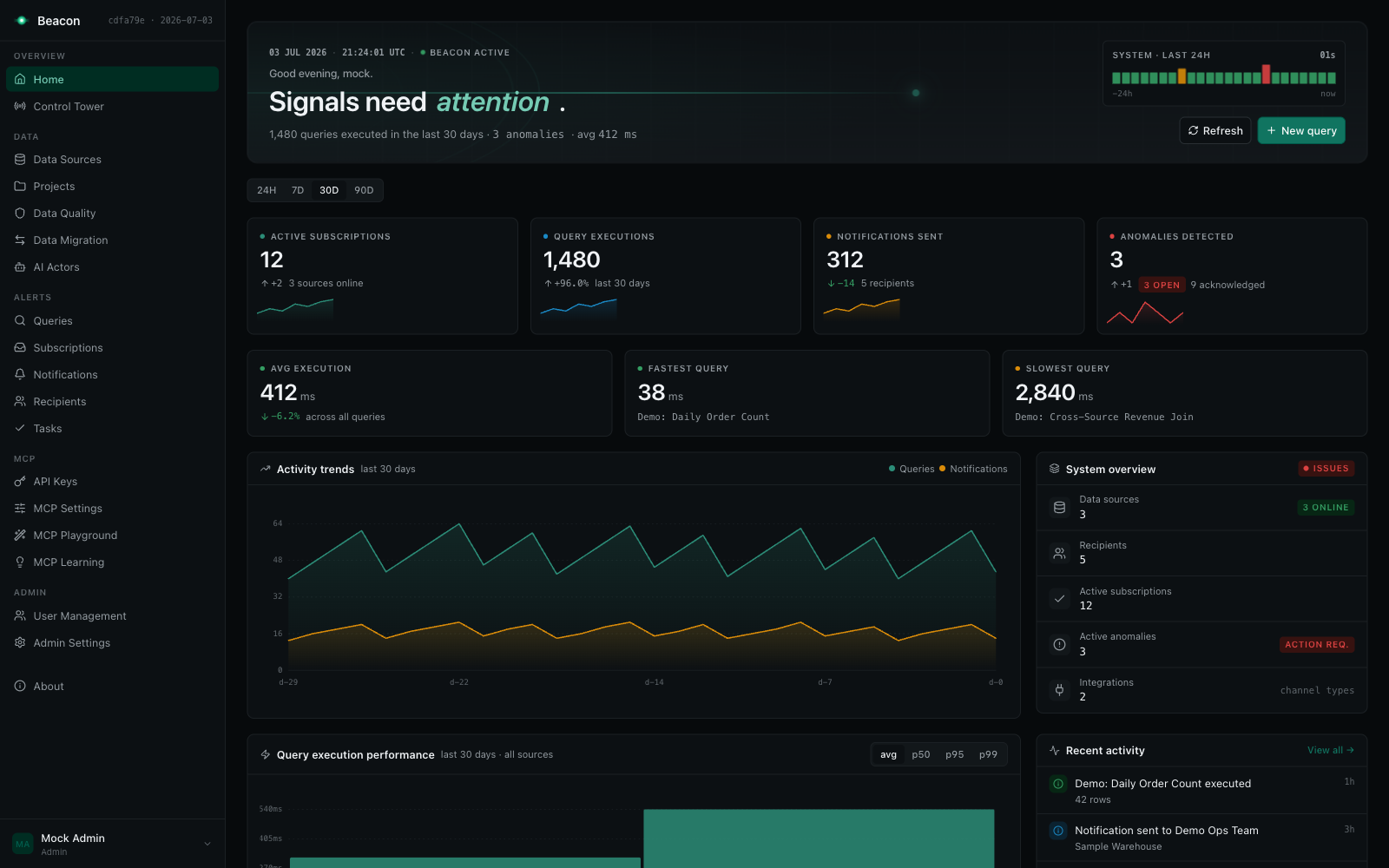
Shown with sample data from Beacon’s built-in mock mode (npm run dev:mock).
Why Beacon?
Beacon is a .NET 9 platform that turns database monitoring into semantic queries, flexible alerting, and cross-database orchestration. You can run it two ways:
- As a self-hostable app — clone the repo and run the
Beacon.SampleProjecthost, which serves the React UI at the root URL/. - As NuGet packages — embed Beacon into your own ASP.NET Core application.
Highlights:
- 9 data sources: PostgreSQL, SQL Server, MySQL, BigQuery, Snowflake, Databricks, Azure Synapse, AWS CloudWatch, and a generic REST API connector
- Flexible alerting: Email, Microsoft Teams, Slack, and Jira notifications with cron scheduling, plus automatic alerting tasks with lifecycle tracking
- Control Tower: real-time health across every scheduled check — success rates, anomalies, open tasks — in one auto-refreshing view
- Query chaining: multi-step queries with cross-database joins via in-memory SQLite (
@@result1,@@result2) - Full results as attachments: email notifications include complete datasets as CSV for Excel analysis
- Governed MCP server: read-only enforced, PII-aware, fully audited access for AI assistants at
/beacon/mcp— with M-Schema-grounded SQL generation, AST validation, and a dry-run repair loop - A learning loop: the MCP server records usage signals and turns them into approved schema clarifications and documentation patches — answers improve with use
- Modern React UI: React 18 + Vite + TypeScript + Tailwind CSS with light & dark themes, served at
/ - AI-powered (experimental): auto-documentation, natural-language → SQL alerts, statistical anomaly detection, and AI actors gated by a human approval workflow
- Schema-agnostic: multi-tenant support with runtime schema configuration
🏗️ System Architecture
Beacon follows a CQRS (MediatR) core with all references converging on Beacon.Core:
graph TB
    subgraph UI["Presentation Layer"]
        React[React SPA<br/>Vite + TypeScript + Tailwind]
    end

    subgraph Edge["Host Edge — Beacon.SampleProject"]
        RestApi[REST API<br/>/beacon/api/*] ~~~ Mcp[MCP Server<br/>/beacon/mcp] ~~~ Hub[SignalR Hub<br/>/beacon/api/hub]
    end

    subgraph Core["Application Core (MediatR / CQRS)"]
        QuerySvc[Query Service] ~~~ SubSvc[Subscription Service] ~~~ MigSvc[Migration Service]
        NotifSvc[Notification Service] ~~~ DataSrcSvc[DataSource Service] ~~~ AiSvc[AI Service]
    end

    subgraph Adapters["Notification Adapters"]
        EmailAdapter[Email] ~~~ TeamsAdapter[Teams] ~~~ SlackAdapter[Slack] ~~~ JiraAdapter[Jira]
    end

    subgraph Data["Data Access Layer"]
        EFCore[EF Core 9<br/>BeaconContext] ~~~ Dapper[Dapper<br/>Hot Paths]
    end

    subgraph Infrastructure["Infrastructure Layer"]
        Meta[(Metadata DB<br/>PostgreSQL / SQL Server)] ~~~ Sources[(9 Data-Source<br/>Connectors)]
        Scheduler[IBeaconScheduler<br/>Pluggable Scheduler] ~~~ SQLiteVM[In-Memory SQLite<br/>Cross-DB Joins]
    end

    React --> Edge
    Edge --> Core
    Core --> Adapters
    Core --> Data
    Data --> Infrastructure
    Core --> Infrastructure
    Adapters --> Infrastructure

    style UI fill:#e3f2fd
    style Edge fill:#ede7f6
    style Core fill:#f3e5f5
    style Adapters fill:#fff3e0
    style Data fill:#e8f5e9
    style Infrastructure fill:#fce4ec
Query Execution Flow
Multi-step queries with cross-database capabilities:
sequenceDiagram
    participant User
    participant Scheduler as Beacon Scheduler
    participant QueryOrchestrator
    participant VirtualTableManager
    participant PostgreSQL
    participant SQLServer
    participant NotificationService
    participant Adapter

    User->>Scheduler: Create Subscription (Cron)
    Scheduler->>QueryOrchestrator: Execute Query (Scheduled)

    QueryOrchestrator->>PostgreSQL: Execute Step 1
    PostgreSQL-->>QueryOrchestrator: Result Set 1
    QueryOrchestrator->>VirtualTableManager: Store @@result1

    QueryOrchestrator->>SQLServer: Execute Step 2 (with @@result1)
    SQLServer-->>QueryOrchestrator: Result Set 2
    QueryOrchestrator->>VirtualTableManager: Store @@result2

    QueryOrchestrator->>VirtualTableManager: Execute Final Query<br/>(JOIN @@result1 and @@result2)
    VirtualTableManager->>VirtualTableManager: Create in-memory SQLite tables
    VirtualTableManager-->>QueryOrchestrator: Combined Results

    QueryOrchestrator->>NotificationService: Send Results
    NotificationService->>Adapter: Dispatch (Email/Teams/Slack/Jira)
    Adapter-->>User: Notification Delivered
Data Migration Flow
ETL orchestration with multiple migration modes:
flowchart LR
    subgraph Source["Source Extraction"]
        Q1[Query Step 1<br/>PostgreSQL]
        Q2[Query Step 2<br/>SQL Server]
        Q3[Query Step 3<br/>MySQL]
    end

    subgraph Transform["Transformation"]
        VT[In-Memory SQLite<br/>Cross-DB Join]
        Enrich[Data Enrichment<br/>Business Logic]
    end

    subgraph Load["Load Operations"]
        Insert[Insert Only<br/>New Records]
        Upsert[Upsert<br/>Insert + Update]
        Truncate[Truncate Load<br/>Full Refresh]
        Sync[Sync Delete<br/>Perfect Mirror]
    end

    subgraph Destination["Destination"]
        Target[(Target Database<br/>Any Engine)]
    end

    Q1 --> VT
    Q2 --> VT
    Q3 --> VT
    VT --> Enrich
    Enrich --> Insert
    Enrich --> Upsert
    Enrich --> Truncate
    Enrich --> Sync
    Insert --> Target
    Upsert --> Target
    Truncate --> Target
    Sync --> Target

    style Source fill:#e3f2fd
    style Transform fill:#f3e5f5
    style Load fill:#fff3e0
    style Destination fill:#e8f5e9
Use Cases
🚨 Data Validation Alerts
Problem: Teams need to ensure data meets business rules and catch data quality issues early.
Solution: Create queries that trigger alerts when data is invalid, missing, or violates constraints — orphaned records, null required fields, invalid state combinations. Also used by DBAs for database-health metrics (table size, connection count, replication lag). Enable task creation to track every incident through to resolution.
Benefits: Early detection, automated data-quality checks, a Control Tower view of overall health.
📊 Scheduled Reports with Attachments
Problem: Teams need automated reports delivered regularly without manual SQL execution.
Solution: Schedule queries with cron expressions and receive full results as Excel/CSV attachments via email. Perfect for daily sales reports, weekly analytics, or monthly summaries.
Benefits: Zero-touch reporting, full-dataset delivery, Excel-ready format, automated scheduling.
Learn more about notifications →
🔄 Data Migration Orchestration
Problem: Teams need auditable data migration across environments and engines.
Solution: Data migration jobs with Insert/Upsert/Truncate/Sync modes, execution history, validation checks, and error tracking.
Benefits: Compliance audit trail, repeatable workflows, error visibility.
Learn more about data migrations →
🤖 AI Assistants via MCP
Problem: AI assistants need safe, governed access to query your databases — and naive prompt-to-SQL pipes produce wrong answers.
Solution: Beacon’s built-in MCP server exposes read-only, PII-aware tools over Streamable HTTP at /beacon/mcp. SQL generation is grounded in an M-Schema context with real sample values, validated by a multi-dialect AST parser, and self-corrected through a dry-run repair loop. Every call is audited, and a learning loop turns usage signals into approved documentation improvements.
Benefits: Read-only enforcement, row limits, PII masking, audit trail, and accuracy that improves with use.
Learn more about the MCP server →
Quick Start
Option A — Run the app
# 1. Start the API host (Kestrel) — http://localhost:5296 / https://localhost:7187
dotnet run --project Beacon.SampleProject --no-launch-profile

# 2. Start the React dev server (Vite) — http://localhost:5173, proxies /beacon/api
npm run dev --prefix Beacon.UI/web
Open http://localhost:5173 (dev) or http://localhost:5296 (served build). On first run, Beacon applies its EF Core migrations and walks you through first-run admin setup. Health check: http://localhost:5296/beacon/api/health.
Want to explore the UI without any backend? npm run dev:mock --prefix Beacon.UI/web runs the full SPA against realistic in-browser mock data (MSW).
Option B — Embed via NuGet
dotnet add package Beacon.Core.PostgreSql
dotnet add package Beacon.UI
using Beacon.Core;
using Beacon.Core.PostgreSql;
using Beacon.UI;

builder.Services.AddBeaconServices(builder.Configuration, options =>
    {
        options.AddBeaconScheduler<YourScheduler>();   // your IBeaconScheduler implementation
        options.UseAI = true;                          // optional, experimental
    })
    .AddPostgreSqlConnector()
    .UsePostgreSql(builder.Configuration.GetConnectionString("BeaconContext")!, "beacon");

builder.Services.AddBeaconCookieAuthentication("/");

var app = builder.Build();
app.UseStaticFiles();
app.UseAuthentication();
app.UseAuthorization();
app.MapBeaconApi();   // /beacon/api/*
app.MapBeaconUi();    // React SPA at root /
app.Run();
appsettings.json:
{
  "ConnectionStrings": {
    "BeaconContext": "Host=localhost;Database=beacon;Username=postgres;Password=yourpassword"
  },
  "Beacon": {
    "EncryptionKey": "your-secure-32-character-key-here"
  }
}
View the detailed installation guide →
Features
Core Capabilities
- Data Sources: Manage encrypted connections across 9 engines
- Queries: Define SQL queries with parameters and multi-step chaining
- Subscriptions: Schedule execution with cron expressions
- Notifications: Deliver results via Email, Teams, Slack, or Jira
- Data Migrations: Orchestrate ETL with Insert/Upsert/Truncate/Sync
- Anomaly Detection: Statistical baselines and deviation alerts
Operations & Quality
- Control Tower: Real-time health across all subscriptions
- Tasks: Automatic alerting tasks with lifecycle tracking and auto-resolution
- Data Quality: Data contracts with scheduled evaluations and scoring
Platform & Admin
- User Management: Internal/external users, role-based access, first-run setup
- Authorization: Pluggable auth providers, cookie sessions, OIDC/SSO
- API Keys: Scoped, SHA256-hashed keys with per-project restrictions
- Admin Settings: Runtime configuration, hot-swap LLM providers, audit trail
- MCP Server: Read-only, audited database access for AI assistants — with playground and learning loop
- AI Integration (experimental): Auto-documentation and NL → SQL alerts
- AI Actors (experimental): LLM-driven monitoring agents with human approval gates
Documentation
Key Features at a Glance
| Feature | Description |
|---|---|
| 9 Data Sources | PostgreSQL, SQL Server, MySQL, BigQuery, Snowflake, Databricks, Azure Synapse, CloudWatch, REST API |
| React UI | React 18 + Vite + TypeScript + Tailwind, light & dark themes, served at / |
| REST API | /beacon/api/* minimal APIs (one endpoint per MediatR handler), OpenAPI at /openapi/v1.json |
| MCP Server | Read-only, audited database access for AI assistants at /beacon/mcp |
| SQL Accuracy Stack | M-Schema grounding with sample values, AST read-only validation, dry-run repair loop |
| MCP Learning Loop | Usage signals become approved schema patterns and documentation patches |
| Control Tower | Real-time subscription health with anomaly sparklines and open-task counts |
| Cron Scheduling | Pluggable IBeaconScheduler with flexible cron expressions — pair it with Moberg Warp |
| Multi-Step Queries | Chain queries with result aggregation and cross-DB joins |
| Notifications | Email (with CSV attachments), Teams, Slack, Jira delivery |
| Alerting Tasks | Auto-created from failed checks, auto-resolved when data recovers |
| Encrypted Secrets | Connection strings encrypted at rest (AES-256-GCM); API keys SHA256-hashed |
| User Management | Built-in users, roles, OIDC/SSO, API keys, first-run setup |
| Schema-Agnostic | Multi-tenant deployments with runtime schema selection |
| Execution History | Complete audit trail of all executions |
Requirements
- .NET 9.0 SDK or later
- Node.js 18+ (for building the React UI when developing or self-hosting)
- PostgreSQL 12+ or SQL Server 2019+ for Beacon’s metadata database
- Encryption key (32-character key for AES-256) — required (
Beacon:EncryptionKey) - (Optional) LLM API key (OpenAI, Anthropic, Azure OpenAI, or AWS Bedrock) for AI features
- (Optional) SMTP/email provider for email notifications
Community and Support
- GitHub Repository: MiBu/semantico
- Report Issues: GitHub Issues
- Discussions: GitHub Discussions
Built for .NET developers who need powerful database monitoring and alerting — and safe AI access to their data